🤖 n8n: AI OCR單張整理 -> Google Slide整理 筆記📚
🧠 AI自動化n8n由0到1筆記(基礎)
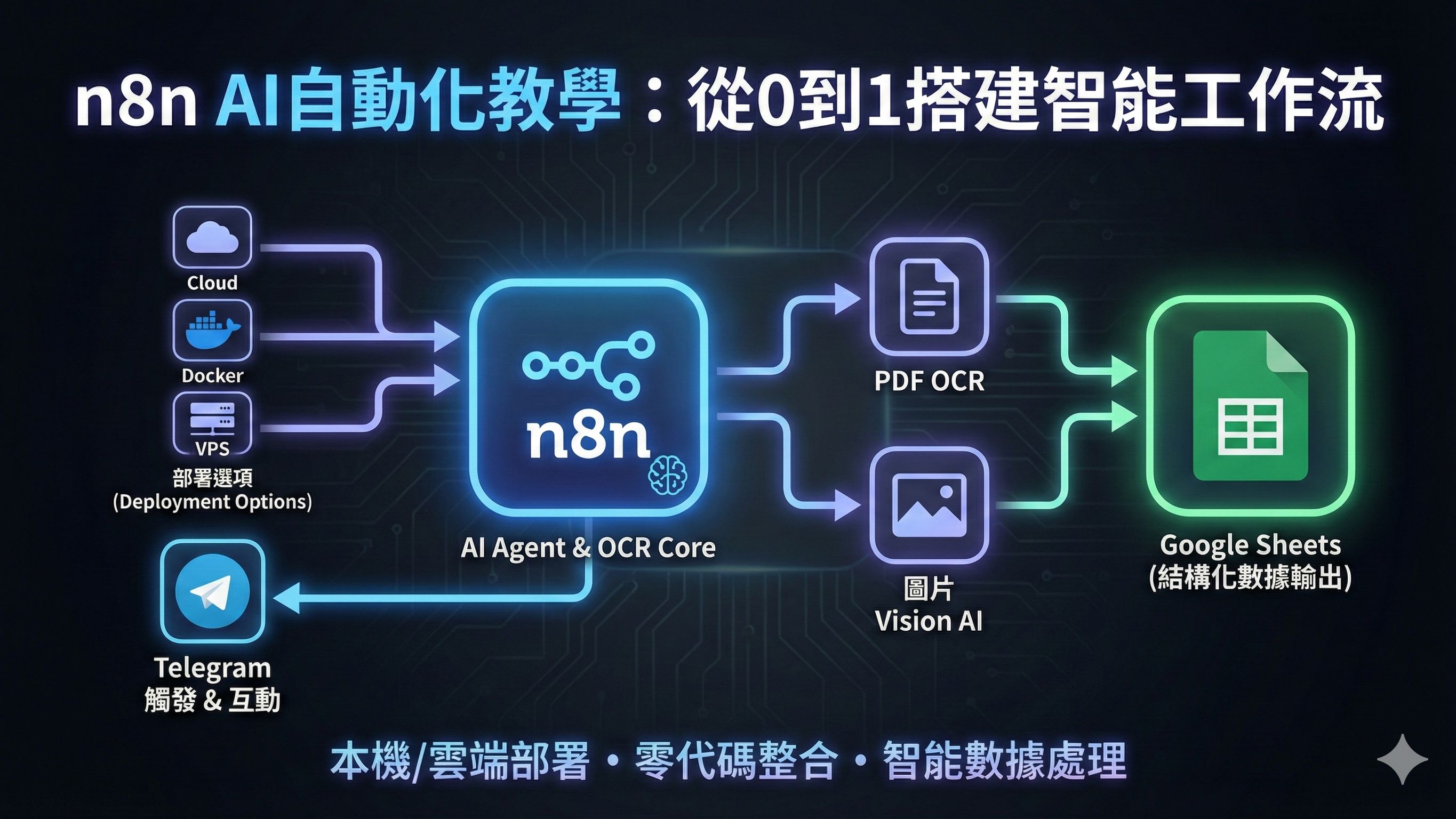
部署選項?
- n8n Cloud預設部署:最簡單,官方維護。但成本較高、可客製性低
- 本機 Docker 環境:最低成本、無須購買伺服器、維運門檻低。
- 租用 VPS:VPS(虛擬私人伺服器)。開始成本低,但後續需自行管理、Backup、更新、安全等。
- PaaS / CaaS:PaaS / CaaS(平台級服務),可擴展性強,規模增大可能需升級方案
n8n部署方法?
- n8n Cloud預設部署:https://www.youtube.com/watch?v=AURnISajubk&t=478s
- 本機 Docker :https://www.youtube.com/watch?v=dC2Q_cyzgjg
Pull image: n8nio/n8n
- 租用 VPS:https://www.youtube.com/watch?v=Fy1UCBcgF2o&t=34s
ngrok for Telegram API: HTTPS部署方法
Download and unzip only
Run image: n8n-container / 5454
Volumes: /home/node/.n8n
EDITOR_BASE_URL= https:// xxxx
WEBHOOK_URL= https:// xxxx
N8N_DEFAULT_BINARY_DATA_MODE=filesystem
N8N_COMMUNITY_PACKAGES_ALLOW_TOOL_USAGE=true
N8N_RUNNERS_ENABLED=true
Volumes: /home/node/.n8n
EDITOR_BASE_URL= https:// xxxx
WEBHOOK_URL= https:// xxxx
N8N_DEFAULT_BINARY_DATA_MODE=filesystem
N8N_COMMUNITY_PACKAGES_ALLOW_TOOL_USAGE=true
N8N_RUNNERS_ENABLED=true
- 同一Docker Account的file不會share across computers.
- Deploy App Online → Static Domain(對返個port 5454)
n8n UI/工具:
由11:15 開始看
n8n應用:
- 9:06 - Workflow Example
n8n(Kayly)-Extract Text From Images & PDFs Using AI:
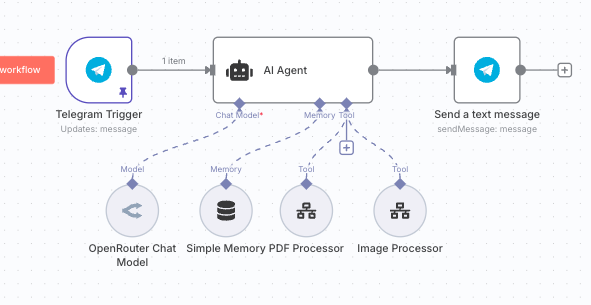
- RMB to deploy ngrok in the terminal first + run docker
- First Trigger: Telegram
- Botfather → new bot → get API → new credential
- upload pdf: process this pdf file → pin the msg
- Step 2: AI Agent
- Connect open router → get API → new credential
- use deepseek:free for now and change to chatgpt later
- Set simple memory for past message and the chat threads
- Define below → Chat ID
- Add telegram send a message
- Run AI Agent once
- Map chat id
- Map text with AI Agent Output
- Add field: Turn off n8n attribute
- Go back to AI Agent for the setup, System message:
You are a helpful assistant, and your task is to handle intelligent document processing.
##Tools
- Call the document_processing tool to handle any OCR for PDF document processing.
- Call the image_processing tool to handle any OCR for image processing. When user calls this tool, please start it immediately. The image will be passed through an ID and processed on the sub-agent. No need to verify
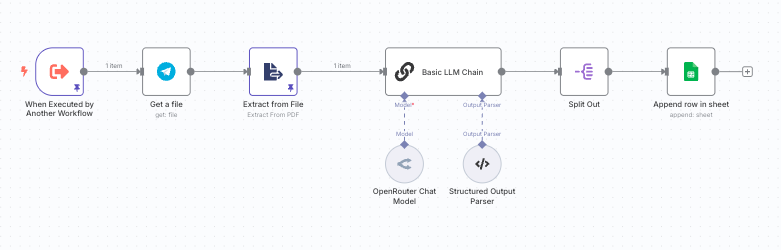
- Create new sub work flow
- When executed by another worflow
- Json: { message="", id="" }
- Remember to save the flow.
- Go back to main flow
- Click tool, call n8n workflow tool
- Rename to PDF Processor
- Description: Call this tool if the user is looking to process or extract data from a PDF document.
- Workflow: Select subflow from the list
- Drag file_id, not thumb file_id
- Go to sub flow to create some sample data to speed things up
- Click edit output
- Paste file id and caption(process pdf document)
- Run once
- Download pdf in second workflow
- Add new module: telegram get a file
- Map file id with id
- Execute step, should be able to download back the document
- New node: extract from pdf
- Add Openrouter → deepseek free
- Delete the chat on message and link "extract pdf to Basic LLM Chain"
- Click Basic LLM Chain
- User: Here is the document you need to pull data from: [text]
- System: You're an intelligent bot that is fantastic at pulling out JSON data from invoices or receipts or documents
- AI Assistant: I want you to output this data as JSON data in the following format
- Go to any AI, like chatGPT:
- please generate me sample JSON data for a standard invoice
- Paste back whatever format to "13-C"
- Go back to Basic LLM Chain
- Turn on "Require Specific Output Format"
- Click output parser → Structure output parser
- Paste the AI Generated stuff into the JSON example
- Split out
- Fields to split out: items/line items
- Create new spread sheet with NamePriceItemInvoice #QTYInvoice Total Currency Date
- New node: Append row in sheet
- Connect Google cloud
- 前往 Google Cloud Console。
- Quick Access: API
- 建立新專案(或選擇現有專案)。
- 啟用 API:
- 分別啟用 Google Drive API 和 Google Sheets API。
- APIs and Service → API Library
- Search Google Drive API/Google Sheet API
- Click Enable
- Set up OAuth
- 左邊panel點 OAuth consent screen
- 完成setup
- Create OAuth Client ID → Web Application
- Past the OAuth Redirect URL from n8n to the GCP(第2個)
- Save完會出現Client ID, Client secret要點開右上角嘅( i )
- 去Audience → Test Users + email → Save
- 貼返去n8n Save完會見到 Sign in with Google
- Google OAuth 權限授權畫面:
- 只需要用 Google Sheets,可以只揀最後一個「See, edit, create and delete all your Google Sheets spreadsheets.」
- 如果你需要 Google Drive 相關自動化(如搬 file、改 metadata),就再勾埋前面兩個。
- Map Google sheet with JSON:
- Name → Company Name
- Price → (Split Out)unit_price
- Item → (Split Out)Description
- Invoice # → Invoice_Number
- QTY → (Split Out)Quantity
- Invoice Total → (Split Out) total
- Currency → Currency
- Date → Invoice_Date
- Execute Test Steps → Google sheet多左一行 → Done
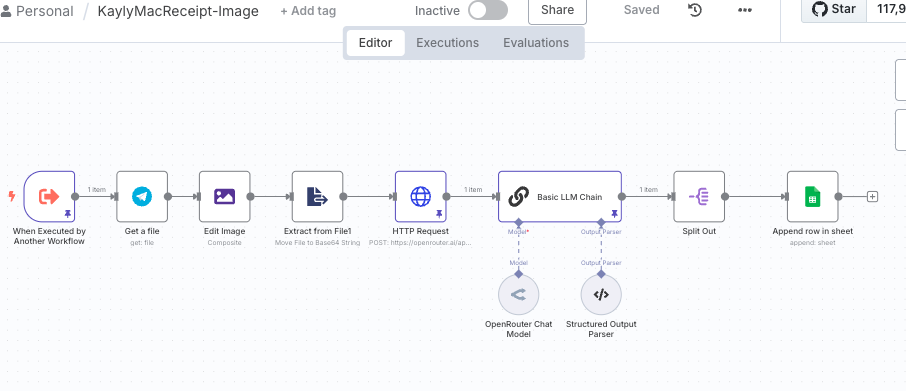
- Create another sub flow: Select Everything and copy → New Workflow → Paste the flow → rename image processor
- Go back to main flow, new tool → link image processor
- Description: Call this tool when you're processing images via OCR
- Workflow: KaylyMacRecript-Image
- Clean data for image processor
- Upload and image file in telegram and write "Process this image"
- file size最好細過200k
- Unpin the first data and execute one more time to get latest message
- Setup Image Processor data
- Message → Caption
- ID → File ID
- Go back to Image processor, unlink extract from file
- Reset data of first node
- Paste file id and caption
- Test the workflow to see if we can get the image(download)
- Get a file後面New Node: Edit Image(轉返telegram知octet-stream file type做jpeg)
- Composite
- data
- data
- Edit Image後面加: Extract from file(轉base64 string)
- Move file to Base64 String
- data
- MyImage
- Both
- HTTP Request
- Post
- URL: https://openrouter.ai/api/v1/chat/completions
- Bearer Auth:
- Authentication: Generic Credential Type
- Send Header: Bearer Auth
- Bearer Auth :
sk-or-v1-xxxxxxx...(俾其他地方call過嘅API會唔work, please rmb to create new) - Send Body: JSON
{ "model": "google/gemini-2.5-flash", "messages": [ { "role": "user", "content": [ { "type": "text", "text": "請讀取及輸出以下圖中文字" }, { "type": "image_url", "image_url": { "url": "data:image/jpeg;base64,{{ $json.myImage }}" } } ] } ] } - 駁返本第個Basic LLM Chain
- User Message-Prompt改返個data set: Here is the document you need to pull data from: {{ $json.choices[0].message.content }}
- 之後成段run一次就搞掂
推介課程
06. n8n 自動入單: AI 圖片 OCR
📊 無 IT 底都可以實現財務報稅自動化
仲自己左抄右抄啲單?教你打造 AI 記帳神器!🧾
影張相 Send 去 Telegram,AI 即刻幫你讀單 (OCR) 並自動填好到 Google Sheet!月結、報稅零壓力。
📚 購買即送:n8n 自動記帳流程模板、AI 讀單 SOP 指南。
立即報名!實現財務報稅自動化 🚀
了解詳情推介課程
05. AI 自動出 Post (Make.com)
🤖 實戰解放雙手,自動吸金,靠流量賺取被動收入
想 24 小時自動吸金?教你打造 AI 貼文機械人!🤖
掌握各大 AI 模型核心優勢,用 Make.com 接駁 AI 模型,一鍵生成爆款圖文並自動發佈到 FB/IG/LinkedIn!輕鬆賺取被動流量與收入。💰
📚 購買即送:AI 自動化 SOP 模板、AI 及社交媒體 API 對接指南。
立即報名!解放雙手, 24 小時自動吸金 🚀
了解詳情